# How to create new template tag
A template tag works much like a standard WordPress shortcode — but you must register it with W4 Post List through the `w4pl/get_shortcodes` filter. The example below adds two WooCommerce tags, `[product_price]` and `[product_short_description]`:
```php
function custom_product_shortcodes( $shortcodes ) {
$shortcodes['product_price'] = array(
'group' => 'Post',
'callback' => 'custom_wc_product_price',
'desc' => ''. __( 'Output', 'text-domain' ) .': product price'
);
$shortcodes['product_short_description'] = array(
'group' => 'Post',
'callback' => 'custom_wc_product_short_description',
'desc' => ''. __( 'Output', 'text-domain' ) .': product short description'
);
return $shortcodes;
}
add_filter( 'w4pl/get_shortcodes', 'custom_product_shortcodes', 20 );
function custom_wc_product_price( $attrs, $content ) {
$post_id = get_the_ID();
$product = wc_get_product( $post_id );
return $product->get_price();
}
function custom_wc_product_short_description( $attrs, $content ) {
$post_id = get_the_ID();
$product = wc_get_product( $post_id );
return $product->get_short_description();
}
```
Register each tag with three keys:
- `group` — the group the tag appears under in the template editor.
- `callback` — the function that returns the tag’s output.
- `desc` — a short description shown beside the tag in the editor.
Once registered, you can use `[product_price]` and `[product_short_description]` inside any list template, just like the built-in tags.
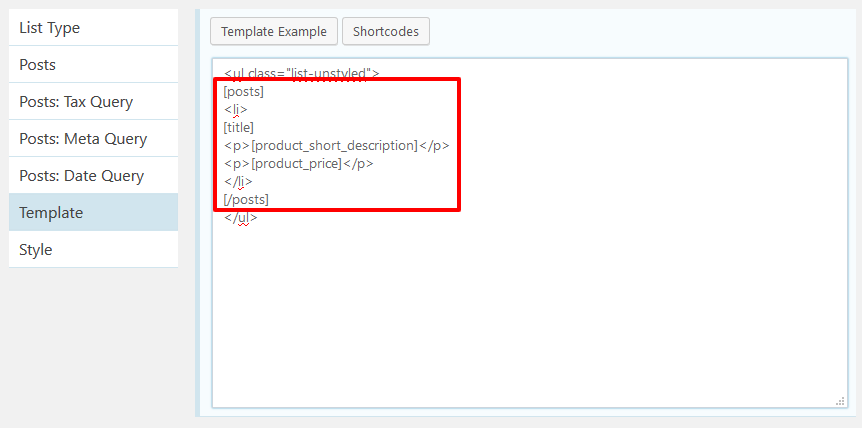W4 post list custom tag used inside posts loop
Source: https://w4dev.com/docs/w4-post-list/how-to-create-new-template-tag/