
Block Theme MCP · Free WordPress plugin
The Site Editor for AI agents.
Block Theme MCP is an MCP server for WordPress block themes. Your AI agent edits the theme’s real files and the templates the Site Editor saves, and every change has a way back.
GPL-2.0-or-later · WordPress 6.9+ · PHP 7.4+ · No account required
$ claude mcp add --transport http my-site https://example.com/wp-json/btm/v1/mcp

# Type /mcp in Claude Code and sign in.
# Approve the consent screen on your site.

> Make the footer links match the header.
Add your site to Claude Code with one command
Approve the connection on your own site
Revert a theme change as one change set
44 toolsIn 10 groups, each with its own switch
3 ways to connectOAuth, Application Password, WebMCP
50 change setsKept per theme, ready to revert
Self-hostedNo cloud service and no account
What an agent can do
Theme files and Site Editor data, with a way back from each change.
The plugin has one job: block themes. An agent gets tools for the theme’s files and for what the Site Editor stores, and nothing is overwritten blindly.
Theme files, with undo
An agent edits the active theme’s templates, template parts, CSS, JS and theme.json, one file or many at once. Every write is a change set you can revert, and every replaced or deleted file is backed up first.
Writes checked against what was read
An update goes through only when the file is still the version the agent read. If someone changed it in between, the agent is told and has to read it again.
Theme-wide search
Find text, a regular expression or a whole class name across the theme’s files, so an agent sees every use of a class before it changes one.
Site Editor templates
List, read, create, update, reset and restore templates and template parts exactly as the Site Editor stores them, with their revisions.
Global styles
Read and update the styles and settings you saved in the Site Editor. An update needs the version the agent read, WordPress keeps a revision, and a reset leaves the revision history in place.
Patterns
List and read every registered pattern. Create, update and trash your own patterns, with a revision saved before each update. Pattern files in the theme are read, never written.
Theme and content
Keep the theme and the saved content in step.
A template customised in the Site Editor lives in the database. One tool writes it into the theme’s files as a change set, so the theme you ship matches the site you built.
Two more tools find a CSS class or a piece of text in saved posts, pages and templates, and replace it.
- A dry run previews every match and writes nothing
- The real run changes exactly the posts the dry run listed
- A revision is saved before each post is written
- Class mode renames a class in HTML and in block attributes together
btm.content-replace{
  "mode": "class",
  "replacements": [
    {
      "from": "hero-title",
      "to": "site-hero__title"
    }
  ],
  "dryRun": true
}
How to connect
Connect an agent in three steps.
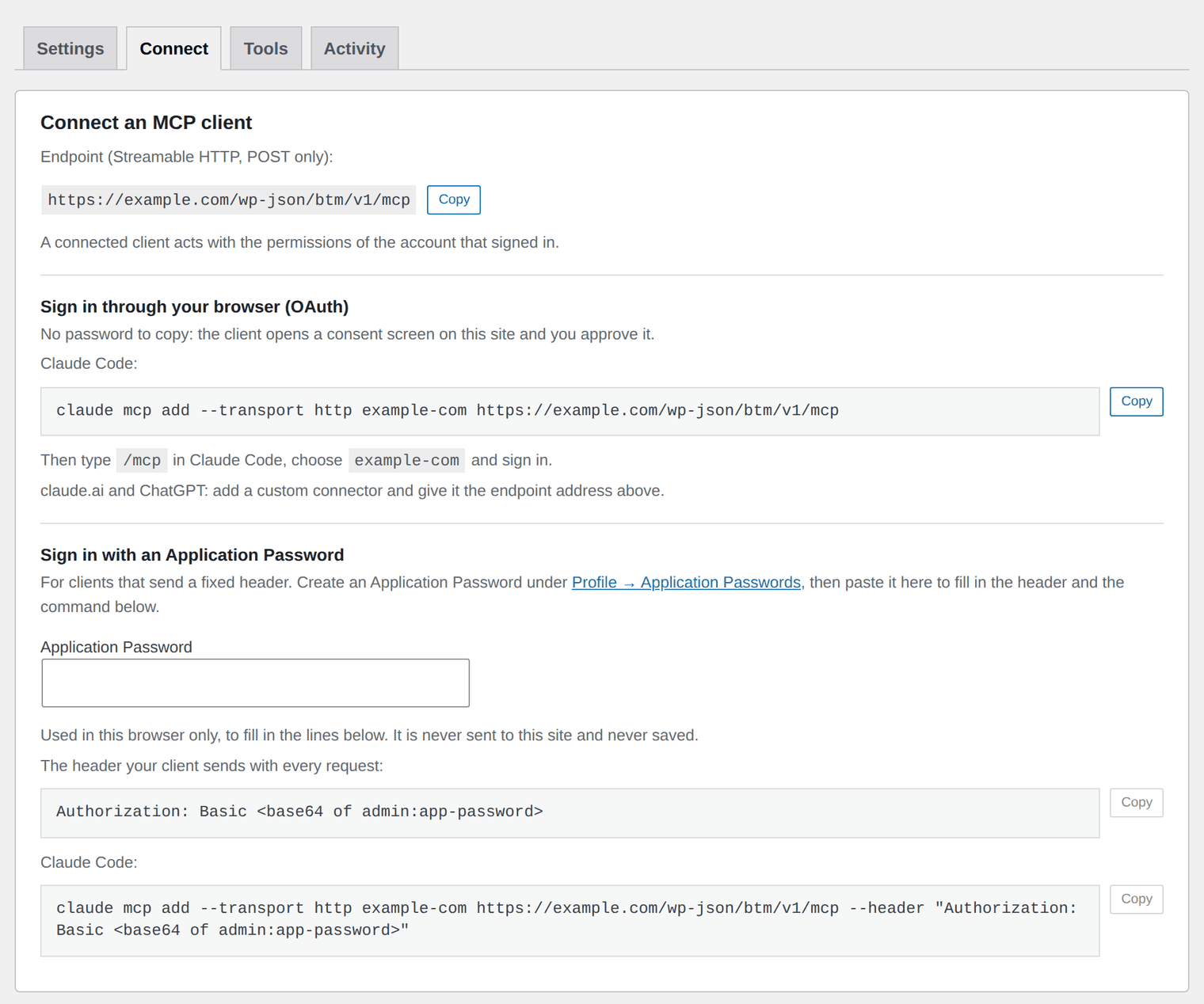
Everything is on one screen in wp-admin: Settings → Block Theme MCP.
Choose what the agent may do
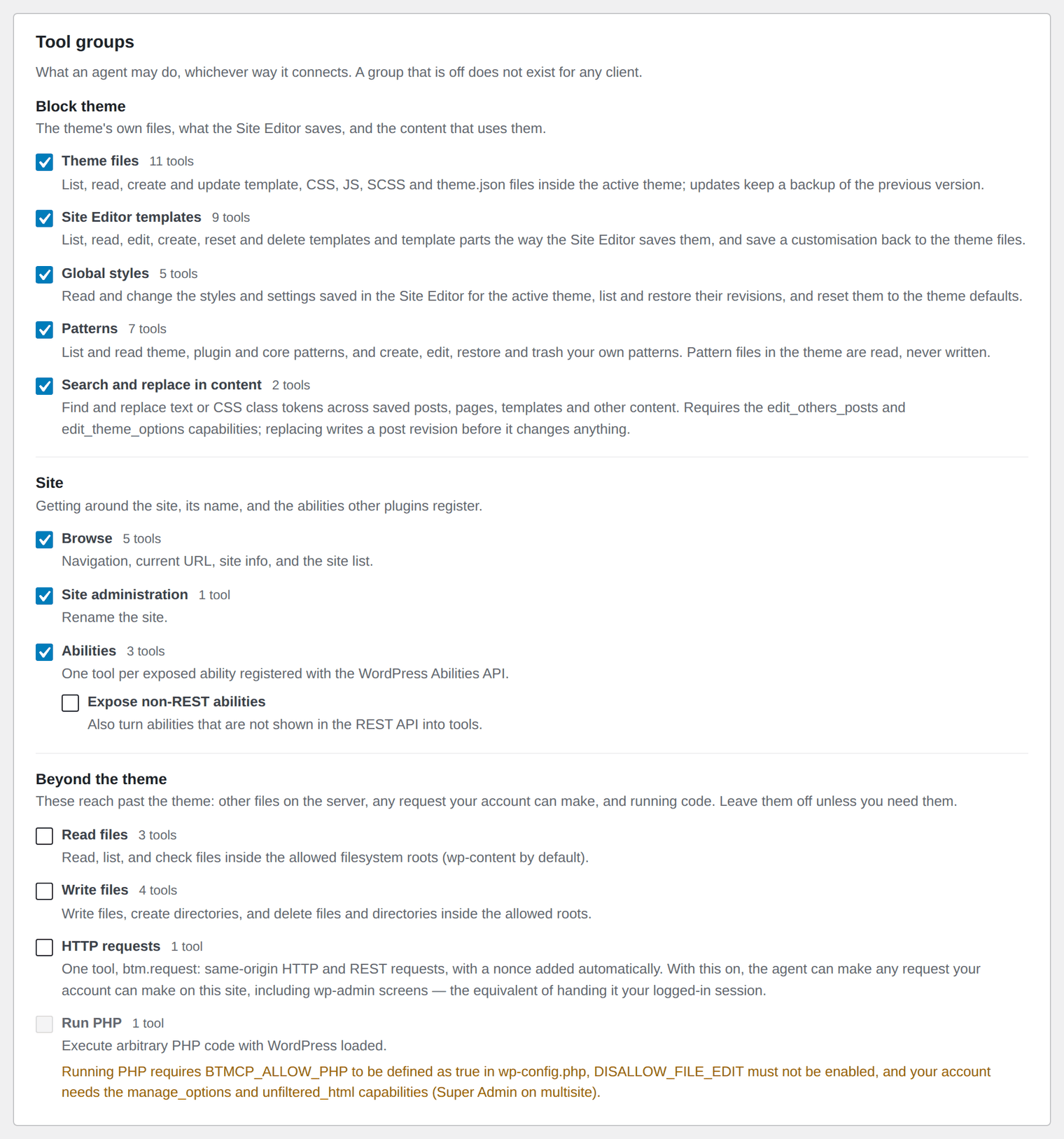
Under Tool groups, switch on the groups you want. For theme work that is Theme files and Site Editor templates.
Choose how it connects
Switch on OAuth for Claude Code, claude.ai and ChatGPT, or Application Passwords for a client that sends a header. Both start off.
Connect and approve
Copy the command or the endpoint from the Connect tab into your client. Sign in to your own site and approve the consent screen.
Ways in
Three ways to connect.
Each way to connect is a separate switch. The same group switches and capability checks apply to all three.
- OAuth. Claude Code, claude.ai and ChatGPT sign in through a consent screen on your own site. There is no password to create or paste. It needs HTTPS.
- Application Password. Any MCP client that speaks Streamable HTTP and can send a header signs in with a WordPress Application Password.
- WebMCP. A browser agent finds the tools in your browser tab. On admin screens this is on from activation. On the front end it is off.
The endpointhttps://example.com/wp-json/btm/v1/mcp
See it, undo it
See what an agent did, and take it back.
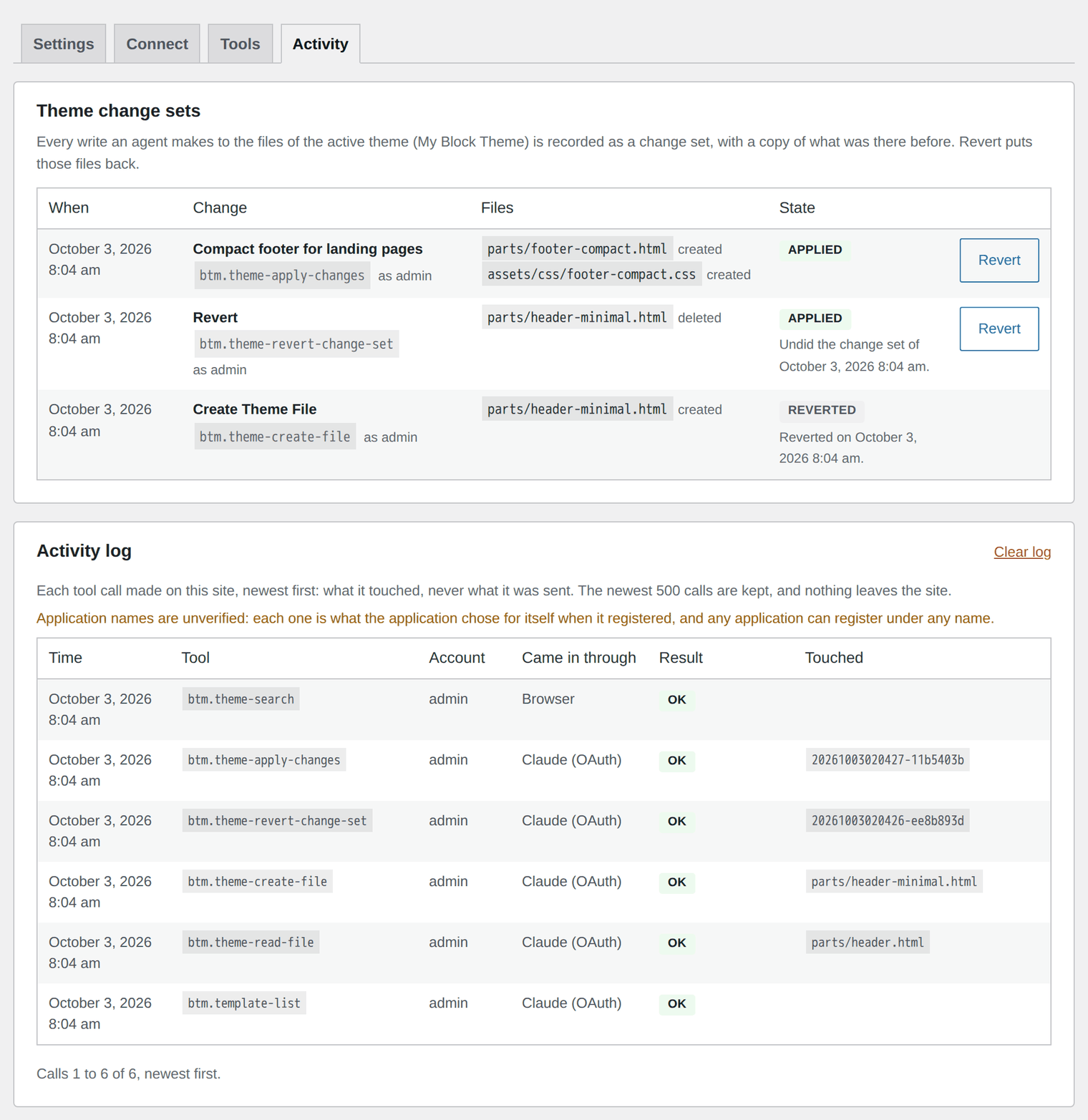
The record stays on your own site, and the undo buttons are yours to press. You do not have to ask the agent.
- The Activity tab lists the theme’s change sets, with a Revert button on each one you can still undo
- The activity log shows each call to a tool that runs on your server: when, which tool, which account and how it came in
- A revert that would overwrite newer work stops and names the files that changed
- Connected apps lists every OAuth connection, with a Revoke button
- Backups and change sets stay on disk if you uninstall the plugin
Safety
Built to be switched on carefully.
The remote ways in start off. So do the theme, template, global styles, pattern, content, file and HTTP request groups. Browse, Abilities and Site administration start on, as do the tools a browser agent finds on admin screens.
- Only a logged-in user with the
manage_optionscapability can use the tools, and every request is checked again on the server - A connected agent works with the permissions of the account it signed in as
- The theme tools do not edit PHP files
- The consent screen shows which application is asking, where you will be sent and which tool groups it would reach. Nothing is granted until you approve
- In the browser, a tool flagged destructive asks before it runs. Remote clients ask in the client
Who it is for
For site owners and theme developers who work with an AI agent.
You have a block theme and an agent, and you want the agent to change the theme without leaving you to guess what it touched.
Restyle a template
Ask for a change to a template or a template part, look at the change set, and revert it if it is not what you wanted.
Rename a class everywhere
Search the theme for a class, rename it in the files, then rename it in saved posts, pages and templates.
Ship what you built in the Site Editor
Write the templates you customised in the Site Editor into the theme’s files before you hand the theme over.
Find every use first
Search the whole theme for a class, a block or a template part before you change or remove it.
Adjust global styles
Change colours, type and spacing in the site’s global styles, with a revision to go back to.
Work alongside other editors
A write is refused when the file or template changed after the agent read it, so nobody’s work is overwritten.
The tools
The tool groups at a glance.
Every group has its own switch. The Tools tab in the settings lists every tool with its status, and a tool inspector lets you run one yourself without an agent.
| Group | Tools | Starts | What it covers |
|---|---|---|---|
| Block theme | |||
| Theme files | 11 | Off | List, read, search, create, update, delete and restore .html, .css, .js and .scss files and theme.json in the active theme. Change sets and backups. |
| Site Editor templates | 9 | Off | Templates and template parts as the Site Editor saves them, their revisions, and saving one back into the theme. |
| Global styles | 5 | Off | Read, update, restore and reset the styles and settings saved in the Site Editor. |
| Patterns | 7 | Off | List and read registered patterns. Create, update, restore and trash your own. |
| Search and replace in content | 2 | Off | Find and replace text or a CSS class in saved content, with a dry run first. |
| Site | |||
| Browse | 5 | On | Site information, the list of sites you can reach, and navigation in the browser tab. |
| Site administration | 1 | On | Rename the site. |
| Abilities | Varies | On | One tool for each WordPress Ability your site has registered and exposed. |
| Beyond the theme | |||
| Read files | 3 | Off | Read and list files inside wp-content. |
| HTTP requests | 1 | Off | Same-origin requests with your browser session. For a browser agent only, never over HTTP or OAuth. |
Availability
Free, and it runs on your own site.
Block Theme MCP is free under the GPL, with no account to create and no licence key to enter. We are testing it now and preparing it for the WordPress.org plugin directory. To try it before then, or to ask a question, contact us.
What you need
- WordPress 6.9 or newer and PHP 7.4 or newer
- A block theme for the template, global styles and pattern tools
- HTTPS, if clients sign in through OAuth
- A Linux or macOS host for the file tools
Frequently asked questions
Common questions about Block Theme MCP.
Which AI clients can connect?
Claude Code, claude.ai and ChatGPT sign in through OAuth. Any MCP client that speaks Streamable HTTP and can send an Authorization header can connect with an Application Password instead. A browser agent can use the tools through WebMCP.
Can an agent edit my theme?
Only if you switch the Theme files group on, and only for users who hold edit_theme_options and edit_themes. The tools are confined to the active theme’s folder and touch only .html, .css, .js and .scss files and theme.json. A theme’s JavaScript runs in every visitor’s browser, so give this group only to people you would let edit the theme in wp-admin.
How does undo work?
Every write to a theme file is recorded as a change set. Reverting one is a new change set, and it refuses with a list of conflicts if a file has changed since. The newest 50 change sets are kept per theme. Every replaced or deleted file is also backed up, the newest 10 per file.
Does it work with a classic theme?
Partly. The Theme files group works on a classic theme’s CSS, JS and theme.json. It does not edit PHP templates. The Site Editor groups need a block theme.
Can an agent write files or run PHP on my site?
It has no tool that runs PHP. It writes files only inside the active theme’s folder, through the Theme files group, which starts off. Every write is a change set you can revert, and the group does not work while DISALLOW_FILE_EDIT is set.
Will a destructive tool run without asking me?
Not by default. In the browser, a tool flagged destructive asks first and shows the arguments it is about to run with. Clients that connect over HTTP or OAuth have no page to show a prompt on, so they ask in their own client.
Can claude.ai or ChatGPT connect to my site?
Yes, once you switch on OAuth in the settings. It is off by default and needs HTTPS. The connector sends you to a consent screen on your own site. The application’s name on that screen is whatever it chose for itself, so approve only a connection you started yourself. You can revoke any connection under Connected apps.
Does the plugin send anything to another service?
No. The MCP server is the plugin, and it runs on your site. There is no cloud service, no account and no telemetry. The activity log is stored in your own database.
Let your agent work on your block theme.
It is in testing now. Contact us to try it early or to ask a question.
Free · GPL-2.0-or-later · WordPress 6.9+ · PHP 7.4+ · No account required