
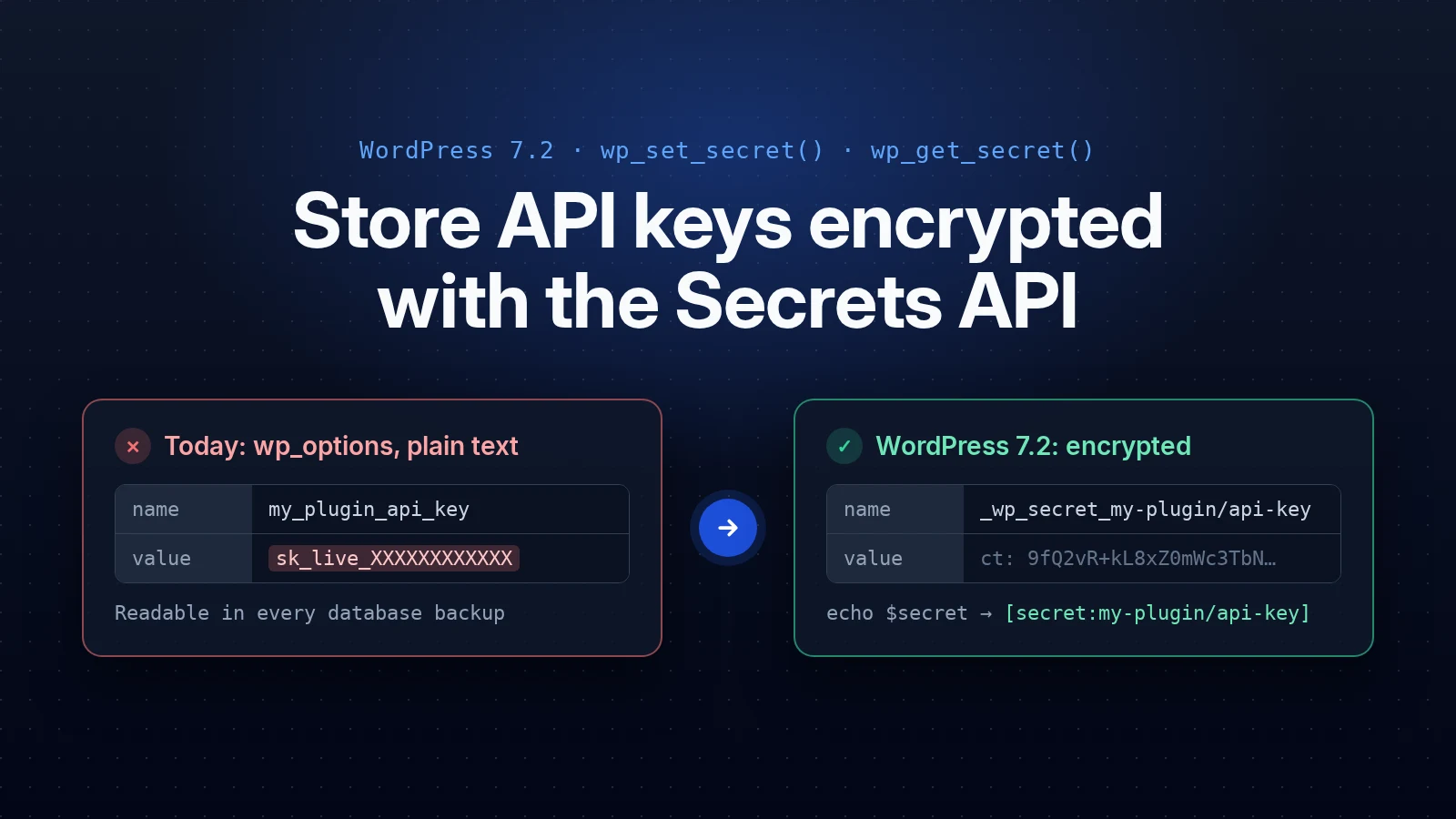
WordPress 7.2 adds a Secrets API: wp_set_secret() stores an API key encrypted, and wp_get_secret() reads it back. It was committed to trunk on October 13, 2026 (r64337, #66187). WordPress 7.2 is planned for December 9, 2026.
Every example and output below comes from my own test on a WordPress trunk install (7.2-alpha). 7.2 is not released yet, so names and details can still change during beta. I will update this page at release.
// Save (from your settings form, after your own capability and nonce checks).
wp_set_secret( 'my-plugin/api-key', $key );

// Read.
$secret = wp_get_secret( 'my-plugin/api-key' );
$key    = $secret->reveal();
That is the whole idea. The rest of this page is what happens under those two calls, and how to use them safely in a plugin that also has to run on older WordPress versions.
Why plugins need it
Plugins that talk to Stripe, Paddle, an SMTP server or a Google API need to store a key somewhere. The usual pattern is: check for a constant in wp-config.php first, then fall back to a saved option. Most site owners never add the constant, because they cannot edit wp-config.php from wp-admin. So the key ends up in wp_options as plain text, and every database dump, backup and staging copy carries it.
With the Secrets API, the admin still pastes the key into your settings screen. The difference is that it is stored encrypted, and the key that unlocks it lives in wp-config.php, not in the database.
What actually gets stored
After wp_set_secret( 'secrets-demo/api-key', 'demo-key-AAAA-1111' ), this is the row in wp_options:
option_name : _wp_secret_secrets-demo/api-key
autoload    : off

Array
(
    [v] => 1
    [current] => Array
        (
            [dk]          => bziAzc0G0Edm0trrlDGcsL+8eQlt+P7AgOYbS9mE7J4/...
            [dk_nonce]    => eQmhiDWQv1eLUlJm9FXrleRsZmjldhBK
            [ct]          => XEWDUWWpKy1iBjnbGfimjDEFXLlUcuPene2ZXOijdc5nRQ==
            [nonce]       => J93IAaTys1vdPHWOnslRoYdTZ7dRTZeO
            [fingerprint] => bb45d981c04226b21584f5b41f81485b
            ...
        )
)
ct is the encrypted key (XChaCha20-Poly1305, from libsodium). dk is the key that encrypted it, itself encrypted. Searching the row for demo-key finds nothing. The row is not autoloaded, so it is only read when your code asks for it.
The keys that unlock it form a chain, and the first link is never in the database:
- Site key: from
WP_SECRETS_KEYinwp-config.php, or, if that is not defined, derived fromLOGGED_IN_KEY+LOGGED_IN_SALT. It is calculated on each request and never saved. - Root key: stored in
_wp_secrets_root_key, encrypted with the site key. - Master key: derived from the root key, in memory only.
- Data key: the
dkabove, encrypted with the master key. A new one is made on every write.
So a stolen database, backup or SQL-injection dump gives ciphertext only. Someone needs wp-config.php as well. If the salts are missing from wp-config.php or still the sample placeholder, the API refuses to work. It never uses the salt copies WordPress keeps in the database.
wp_get_secret() returns an object, not a string
Reading a secret gives you a WP_Secret object that will not print its value by accident. Real output from my test:
$secret = wp_get_secret( 'secrets-demo/api-key' );

echo $secret;            // [secret:secrets-demo/api-key]
wp_json_encode( $secret ); // "[secret:secrets-demo\/api-key]"
var_dump( $secret );     // object(WP_Secret)#2551 (1) { ["value"]=> string(29) "[secret:secrets-demo/api-key]" }
print_r( $secret );      // WP_Secret Object ( [value] => [secret:secrets-demo/api-key] )
$secret->fingerprint();  // bb45d981c04226b21584f5b41f81485b
$secret->reveal();       // demo-key-AAAA-1111

serialize( $secret );    // LogicException: WP_Secret cannot be serialized.
clone $secret;           // LogicException: WP_Secret cannot be cloned.
So a key cannot leak through a debug log, a JSON response or the object cache. reveal() is the only way to the real value, which also makes every place your plugin touches a credential easy to find: search for ->reveal(). Call it right before the HTTP request and keep the result in a local variable.
fingerprint() is a one-way identifier. The same value always gives the same fingerprint, so you can confirm a re-entered key matches the saved one without displaying either.
Three possible results: handle all of them
| Return | Meaning | What to do |
|---|---|---|
WP_Secret | It exists and decrypted | ->reveal() and use it |
null | Never saved | Show your “connect” / “enter API key” screen |
WP_Error | It exists but cannot be read (site key changed, vault down) | Show an admin notice. Do not fall back to an old plain-text option |
Keeping “missing” and “broken” apart is deliberate: if both returned false, a site whose key changed would quietly reset your plugin to its setup screen.
A getter that works on every WordPress version
Your plugin will support WordPress below 7.2 for a while, so feature-detect the API. This keeps the constant as the first choice for people who manage wp-config.php, uses the Secrets API on 7.2+, and falls back to the old option only when it has to:
function my_plugin_get_api_key() {
	// 1. A constant in wp-config.php always wins.
	if ( defined( 'MY_PLUGIN_API_KEY' ) && MY_PLUGIN_API_KEY ) {
		return MY_PLUGIN_API_KEY;
	}

	// 2. WordPress 7.2+: the Secrets API.
	if ( function_exists( 'wp_get_secret' ) ) {
		$secret = wp_get_secret( 'my-plugin/api-key' );

		if ( $secret instanceof WP_Secret ) {
			$value = $secret->reveal();
			return is_wp_error( $value ) ? '' : $value;
		}

		if ( is_wp_error( $secret ) ) {
			return ''; // Stored but unreadable: show a notice, never fall back.
		}
	}

	// 3. Older WordPress, or not migrated yet.
	return (string) get_option( 'my_plugin_api_key', '' );
}

function my_plugin_save_api_key( $key ) {
	if ( function_exists( 'wp_set_secret' ) ) {
		return wp_set_secret( 'my-plugin/api-key', $key ); // true or WP_Error.
	}

	return update_option( 'my_plugin_api_key', $key, false );
}
The functions do not check capabilities, because they also have to work from cron and REST requests. Your settings form or REST route must check current_user_can() and a nonce before calling my_plugin_save_api_key(). Core adds a manage_secrets capability (administrators) and manage_network_secrets (super admins) you can use for that.
If a host replaces the storage with a read-only vault, wp_secrets_provider_is_writable() returns false and saving fails. Use it to disable your Save button and say the key is managed by the host.
Secret names
Names are plugin-slug/key-name: lowercase letters, numbers, - and _, one /, up to 172 characters. Core enforces it. My test with an uppercase name:
wp_set_secret( 'secrets-demo/API-Key', 'x' );
// WP_Error [secret_invalid_name] Secret name segments may contain only lowercase letters,
// numbers, hyphens, and underscores, and must not start or end with a hyphen or underscore.
A name without the plugin-slug/ part still saves, with a _doing_it_wrong() notice. The prefix keeps names apart, but it is not access control: any plugin can read any secret.
Migrating a key you already store in wp_options
Core will not touch your options for you. wp_import_option_as_secret() copies one option into a secret, leaves the original option in place, and flags the secret as “needs rotation”. Verify the copy, then delete the option yourself:
function my_plugin_migrate_api_key() {
	if ( ! function_exists( 'wp_import_option_as_secret' ) ) {
		return;
	}

	$old = get_option( 'my_plugin_api_key' );
	if ( ! is_string( $old ) || '' === $old ) {
		return; // Nothing to migrate (or already done).
	}

	$result = wp_import_option_as_secret( 'my_plugin_api_key', 'my-plugin/api-key' );
	if ( is_wp_error( $result ) ) {
		return; // Try again on the next run.
	}

	$secret = wp_get_secret( 'my-plugin/api-key' );
	if ( $secret instanceof WP_Secret && hash_equals( $old, (string) $secret->reveal() ) ) {
		delete_option( 'my_plugin_api_key' ); // Only after a verified read-back.
	}
}
Run it from your plugin’s upgrade routine. In my test:
wp_import_option_as_secret()  : true
Read-back matches old value   : true
Original option still there   : legacy-key-CCCC-3333
Option deleted after verify   : (gone)

wp_list_secrets( 'secrets-demo' ):
{"name":"secrets-demo/legacy-key","fingerprint":"48687e58...","has_previous":false,"needs_rotation":true}
Why “needs rotation”: the old plain-text key is already sitting in past backups, and encrypting it now does not change that. The real fix is a new key from the provider. Site Health lists the secrets that still need one. Only import string options (wp_import_option_as_secret() returns WP_Error otherwise), and do not run it twice over an existing secret: a second import moves the current value to the previous slot.
Rotation: CURRENT and PREVIOUS
Saving a new value keeps the old one in a second slot, so you can switch keys without downtime: try the new key, fall back to the previous one until the provider accepts the new one, then retire it.
wp_set_secret( 'secrets-demo/api-key', 'demo-key-BBBB-2222' );

wp_get_secret( 'secrets-demo/api-key' )->reveal();                             // demo-key-BBBB-2222
wp_get_secret( 'secrets-demo/api-key', WP_Secret_Version::PREVIOUS )->reveal(); // demo-key-AAAA-1111

wp_retire_secret_version( 'secrets-demo/api-key' );                           // true
wp_get_secret( 'secrets-demo/api-key', WP_Secret_Version::PREVIOUS );         // null
There are only ever two slots. I saved one secret 200 times to check:
| Saves | Row size | Current | Previous |
|---|---|---|---|
| 2 | 757 bytes | value-2 | value-1 |
| 50 | 757 bytes | value-50 | value-49 |
| 200 | 765 bytes | value-200 | value-199 |
then wp_retire_secret_version() | 391 bytes | value-200 | none |
The extra 8 bytes are just the longer value. No history piles up, on purpose: every old credential kept is one more real key in your backups. Nothing retires the previous slot automatically, because core cannot know when the provider stopped accepting the old key.
Set WP_SECRETS_KEY before you store anything
Without WP_SECRETS_KEY, the site key is derived from your salts. That works, but it has a catch: changing your salts (a common step after a hack) makes every secret unreadable. Site Health recommends a dedicated key. Generate one in the right shape, 32 random bytes in base64:
php -r 'echo base64_encode( random_bytes( 32 ) ), PHP_EOL;'// wp-config.php
define( 'WP_SECRETS_KEY', 'paste-the-generated-value-here' );Any other shape (a random phrase) still works, but Site Health then says the key “should be regenerated”. Site Health also mentions a wp secret generate-key command, which lives in the feature plugin, not in core, so use the PHP line above.
The trap: add the constant before any secret is stored. On a site that already has secrets, adding WP_SECRETS_KEY changes the site key, and every call fails, including saving a new secret. My test, with secrets saved first and the constant added afterwards:
wp_get_secret( 'secrets-demo/api-key' )
// WP_Error [secret_key_unavailable] The wrapped key material could not be decrypted with the configured site key.

wp_set_secret( 'secrets-demo/other', 'x' )
// WP_Error [secret_key_unavailable] The wrapped key material could not be decrypted with the configured site key.
Nothing decrypts to garbage and nothing falls back to plain text. Removing the constant again made everything readable. Switching an existing site to a dedicated key needs a proper key rotation, which core supports internally but does not expose yet.
Is it slow?
Measured on a fresh trunk install, first call in a request after a cache flush:
| First call | Queries | Later calls in the same request | |
|---|---|---|---|
get_option(), plain-text key | 0.7 ms | 2 | cached |
wp_get_secret() | 1.1 ms | 3 | 0.011 ms each |
The extra query is the root key, once per request. The encrypted row and the unlocked root key stay in memory for the rest of the request; each further call is only a decrypt. The decrypted value is never put in the object cache, not even with Redis or Memcached.
Logging changes: the wp_secret_changed hook
Every create, update, delete, import and retire fires an action with fingerprints, never the value. It is the right place for an activity log:
add_action( 'wp_secret_changed', function ( $name, $action, $actor_id, $timestamp, $old_fingerprint, $new_fingerprint, $network ) {
	// $action: created, updated, deleted, imported or retired.
	// $actor_id is 0 when no user is logged in (cron, CLI).
	error_log( "Secret {$name} {$action} by user {$actor_id}" );
}, 10, 7 );
From my test run:
created  secrets-demo/api-key  actor=0  old_fp=-                                  new_fp=bb45d981c04226b21584f5b41f81485b
updated  secrets-demo/api-key  actor=0  old_fp=bb45d981c04226b21584f5b41f81485b  new_fp=7ddf597ec65ade0c64a9b61e4db6847a
retired  secrets-demo/api-key  actor=0  old_fp=bb45d981c04226b21584f5b41f81485b  new_fp=-
There is no filter on the read path, on purpose: a filter that receives every credential in plain text is one any plugin could use to collect them.
What it protects, and what it does not
| Protected | Not protected |
|---|---|
| Database dumps and database backups | A malicious or hacked plugin (it can call wp_get_secret()) |
SQL injection that reads wp_options | An admin account that can run code snippets |
| Staging copies and read replicas | Someone who has the database and wp-config.php (for example a full-site backup zip) |
| Keys showing up in debug logs, JSON output, screenshots | Code execution on the server |
It is a hardening layer, not a sandbox. If you can manage wp-config.php or environment variables, a constant is still the strongest option. The Secrets API is for the large majority of sites where the admin pastes the key into a settings screen. Also note that options.php still lists the encrypted rows by name, so do not treat the names themselves as secret.
For hosts: the secrets.php drop-in
Storage is replaceable, like the object cache. A wp-content/secrets.php drop-in can swap in a different store (where the ciphertext lives) or keyring (what protects the root key, such as AWS KMS or HashiCorp Vault). It fails closed: if the vault is unreachable, every call returns WP_Error rather than falling back to local storage. wp_using_secrets_dropin() and wp_secrets_provider_label() tell your plugin what is in use. Site Health → Info has a Secrets API section with the provider, the key source and whether saving is allowed.
Function reference
| Function | Returns |
|---|---|
wp_set_secret( $name, $value ) | true|WP_Error |
wp_get_secret( $name, $version = WP_Secret_Version::CURRENT ) | WP_Secret|null|WP_Error |
wp_delete_secret( $name ) | true|WP_Error |
wp_list_secrets( $namespace = '' ) | array|WP_Error: name, fingerprint, created, has_previous, needs_rotation (never values) |
wp_import_option_as_secret( $option, $name ) | true|WP_Error |
wp_retire_secret_version( $name ) | true|WP_Error |
wp_secrets_provider_is_writable() | bool |
wp_using_secrets_dropin() | bool |
wp_secrets_provider_label() | string |
Multisite has network versions: wp_set_network_secret(), wp_get_network_secret(), wp_delete_network_secret(), wp_list_network_secrets() and wp_retire_network_secret_version(). Network secrets are stored in wp_sitemeta, and site and network secrets never fall back to each other. There is no network version of the import function.
Not in 7.2: an admin screen for secrets (planned for 7.3) and WP-CLI commands (they stay in the feature plugin for now).
Checklist for plugin developers
- Find every option where your plugin stores a credential.
- Read and save it through one getter and one setter that use the Secrets API when
function_exists( 'wp_get_secret' ). - Keep the wp-config.php constant as the first choice.
- Handle
WP_Secret,nullandWP_Errorseparately; never fall back to plain text on an error. - Call
->reveal()only where the key is used; never log, cache or store the result. - Check capabilities and a nonce in your own settings form and REST routes.
- Migrate with
wp_import_option_as_secret(), verify withhash_equals(), then delete the option. - Ask users to create a new key at the provider after migrating.
- Test now on a trunk or nightly install.
Discussion: I asked other WordPress developers what they think of the Secrets API on r/ProWordPress. See the thread on Reddit.
Sources
- Changeset r64337 and Trac #66187
- Proposal: A Secrets API for WordPress 7.2 (Make WordPress Core)
- secretsapi.dev, the feature project’s documentation, and the feature plugin
- WordPress 7.2 call for volunteers (release schedule)